MySQL#
MySQL is an open-source relational database management system (RDBMS) that uses Structured Query Language (SQL) to store, manage, and manipulate data. It is one of the most widely used database systems in web applications becausae of its speed, reliability, and ease of use.
Developed and maintained by Oracle Corporation. Supports multiple platforms including Windows, Linux, and macOS. Commonly used with programming languages like PHP, Java, and Python to build dynamic applications. Known for its scalability, strong security features, and large developer community support.
Working of MySQL#
MySQL processes client requests and interacts with stored data to execute SQL queries efficiently. It follows a structured workflow to retrieve or modify data while ensuring accuracy and reliability.
MySQL receives a query, processes it efficiently, interacts with stored data, and returns the results while maintaining data integrity and reliability.
A user sends an SQL query to the MySQL server through an application, programming interface, or command-line tool to perform a database operation.
The MySQL server establishes a connection with the client application, creating a session that allows queries to be sent and processed.
The server analyzes the SQL query to check for syntax errors and verifies whether the query structure is valid.
MySQL evaluates different execution strategies and selects the most efficient way to process the query.
The server exceutes the query to retrieve, insert, update, or delete data from the database.
MySQL uses storage engines such as InnoDB or MyISAM to manage how data is stored, retrieved, and maintained on disk.
After executing the query, the server prepares the requested data or confirmation message as the result.
The generated result is sent back from the MySQL server to the client application.
The application receives the response and displays the results to the user in a readable format.
MySQL manages transactions to ensure that multiple operations are executed reliably and maintain data consistency.
The server records logs that help recover data and store operations if system failures occur.
MySQL supports data replication across multiple servers and regular backups to improve performance and ensure data safety.
Features in MySQL#
MySQL is a popular choice for managing relational databases for several reasons:
MySQL is free and open-source, allowing modification and distribution.
It offers fast data retrieval and processing for large datasets.
Ensures data integrity and reliability, especially with InnoDB storage.
Supports large databases and high traffic with features like partitioning and clustering.
Offers different storage engines (e.g. InnoDB, MyISAM) for flexible use.
Supports master-slave replication for data redundancy and high availability.
Provides user authentication, SSL encryption, and secure data storage options.
Who Uses MySQL#
MySQL is a widely-used relational database management system (RDBMS) that caters to various user groups, from small businesses to large enterprises.
SMBs use MySQL to manage customer data, transactions, and business records efficiently.
Large companies use MySQL to handle large databases and high-traffic applications.
Developers use MySQL as a backend databsae for websites and web applications.
Schools and universities use MySQL for teaching database management and SQL concepts.
Applications of MySQL#
MySQL is widely used across different industries due to its reliability, scalability, and performance. It supports various applications that require efficient data storage and management.
MySQL is used in e-commerce platforms to manage product catalogs, customer information, orders and transactions.
Many CMS platforms use MySQL to store website content, user data, comments, and configuration settings.
MYSQL helps manage transactional data, customer accounts, and financial records in banking and payment systems.
Healthcare applications use MySQL to store and manage patient records, medical histories, and treatment information.
Many social media platforms rely on MySQL to store user profiles, posts, comments, and other interactions.
The Cloud and The Future of MySQL#
Cloud technology has significantly influenced the development of MySQL, enabling better scalability, availability, and performance for modern applications.
Cloud Integration#
Cloud platforms enable MySQL to run as managed services with easier deployment, sacling, and maintenance.
Cloud providers such as AWS, Google Cloud, and Microsoft Azure offer managed MySQL services like Amazon RDS and Google Cloud SQL to simplify database management and maintenance.
Cloud environmetns allow MySQL databases to scale resources dynamically based on application demand.
Enhanced Features#
Cloud-based MySQL solutions provide improved reliability, availability, and automated management features.
Cloud-based MySQL solutions provide built-in high availability and disaster recovery options to improve reliability.
Cloud platforms offer automated backup systems that help maintain data safety and simplify recovery.
Future Trends#
The future of MySQL includes deeper integration with modern cloud technologies and advanced data systems.
Organizations increasingly combine on-premises databases with cloud environments for better flexibility.
MySQL is being integrated with cloud analytics and machine learning platforms to enable deeper data insights.
MySQL may evolve to support serverless environments, making databsae management more efficient and cost-effective.
MySQL versus SQL#
MySQL is a Relational Database Management System (RDBMS) used to store and manage databases.
It is a database softawre that implements SQL to manage data.
MySQL is open-source and freely available.
It supports basic programming languages like C, C++, Python, Ruby, etc.
MySQL is used to store, manage, and organize data in databases.
SQL (Structured Query Language) is a standard language used to communicate with relational databases.
It is a query language used to create, retrieve, update, and delete data.
SQL is a standard language, not a software product.
SQL is used within database systems like MySQL, PostgreSQL, SQL Server, and Oracle.
SQL is used to write queries to interact with those databases.
MySQL Data Types#
MySQL data types define the type of data that can be stored in a table column. They help ensure that data is stored in a structured and efficient way.
Ensure that only valid and appropriate data is stored in each column.
Improve storage efficiency and query performance.
Include categories such as numeric, string, date & time, and spatial data types.
Choosing the Right Data Type
Selecting the correct data type is important for efficient storage and performance. Some key considerations include:
Choose
INTfor whole numbers.Use
VARCHARfor variable-length text.Use
DATEorDATETIMEfor date and time values.Use
DECIMALfor financial calculations to maintain precision.
MySQL data types are mainly divided into the following categories:
Numeric Data Types#
Numeric data types in MySQL are used to store numeric values such as integers and decimal numbers. They allow databases to perform mathematical operations and store numbers with different ranges and precision.
Used to store whole numbers such as IDs, counts, or quantities.
Used to store very small integer values, often for flags or status values.
Used to store small integer numbers that require less storage.
Used to store very large integer values beyond the range of INT.
Used to store exact numeric values with fixed precision, commonly for financial data.
Used to store approximate decimal numbers with single precision.
Used to store approximate decimal numbers wit hdouble precision for higher accuracy.
String Data Types#
String data types in MySQL are used to store text or character data. These data types allow storing names, descriptions, emails, and other textual information.
Used to store fixed-length character strings.
Used to store variable-length character strings.
Used to store large amounts of text data.
Used to store very short text data.
Used to store medium-length text data.
Used to store very large text values.
Date and Time Data Types#
Date and Time data types in MySQL are used to store date and tiem values. They help manage information such as timestamps, event dates, and schedules.
Used to store date values in YYYY-MM-DD format.
Used to store time values in HH:MM:SS format.
Used to store both date and time values.
Used to store date and tiem values with automatic updates.
Used to store year values in four-digit format.
Spatial Data Types#
Spatial data types in MySQL are used to store geometric and geographic data. These data types are commonly used in location-based applications and geographic information systems.
Used to store geometric objects such as points, lines, and polygons.
Used to store a single coordinate location.
Used to store a line formed by multiple points.
Used to store polygon shapes defiend by multiple coordinates.
User Management#
MySQL user management is the process of creating, modifying, deleting users and controlling their access permissions in the MySQL server.
CREATE USER Statement#
The CREATE USER statement in MySQL is used to create new user accounts that can access the MySQL database server. It allows database administrators to define login credentials and control who can connect to the database.
The CREATE USER command creates a new database account with a username and password for authentication. MySQL identifies users using the format username@host, which specifies the user and the host from which they can connect. For example, a user connecting from the local machine may have an account like admin@localhost. User account details are stored in the user grant table of the MySQL database, which manages authentication and access control.
CREATE USER user_account IDENTIFIED BY password;
user_accountIt is the name that the user wants to give to the database account. THe
user_accountshould be in the format'username'@'hostname'.passwordIt is the password used to assign to the
user_account. The password is specified in theIDENTIFIED BYclause.
Working with CREATE USER Statement#
The following examples demonstrate how the CREATE USER statement works in MySQL and how it is used to create and manage database user accounts.
Create Single User#
In this example, a new user gfguser1 is created that can connect tothe MySQL database server from localhost with the password abcd.
CREATE USER 'gfguser1'@'localhost' IDENTIFIED BY 'abcd';
Create Multiple Users#
In this example, multiple users are created who can connect to the MySQL database server from localhost.
CREATE USER
  'gfguser2'@'localhost' IDENTIFIED BY 'efgh',
  'gfguser3'@'localhost' IDENTIFIED BY 'uvxy';
Allowing a User Account to Connect from Any Host#
To allow a user account to connect from any host, the percentage % wildcard is used in the following way.
CREATE USER 'gfguser1'@'%'
  IDENTIFIED BY 'abcd';
To allow the user account to connect to the database server from any subdomain of mysqltutorial.org, the percentage wildcard % can be used as follows:
CREATE USER 'gfguser'@'%.myqsltutorial.org'
  IDENTIFIED BY 'abcd';
View Permissions of a User Account#
The SHOW GRANTS statement is used to view the permissions of a user account.
SHOW GRANTS FOR user_account;
+----------------------------------------------+
| Grants for gfguser1@localhost                |
+----------------------------------------------+
| GRANT USAGE ON *.* TO `gfguser1`@`localhost` |
+----------------------------------------------+
1 row in set (0.00 sec)
The *.* in the output denotes that the gfguser1 user account can only login to the database server and has no other privileges.
DROP USER Statement#
Managing user accounts in MySQL is important for maintaining database security and controlling access to the server. The DROP USER statement allows administrators to remove user accoutns that are no longer required.
The DROP USER statement is used to delete an existing user account from the MySQL server. When a user account is removed, all privileges assigned to that user are automatically revoked. After the user is dropped, they can no longer log in or access the MySQL database server.
DROP USER 'username'@'host';
usernameThe name of the user you want to delete.
host: The hostname or IP address from which the user is allowed to connect. Use % to indicate any host.
Note
If a DROP USER command is executed while the user session is active, the account is removed only after the session ends, and the user cannot log in again.
Working with DROP USER Statement#
The following examples demonstrate how the DROP USER statement works in MySQL and how it can be used to delete single or multiple user accoutns from the MySQL server. Suppose there are 4 users in the MySQL database server as listed below:
+----------+-----------+
| user     | host      |
+==========+===========+
| gfguser1 | localhost |
+----------+-----------+
| gfguser2 | localhost |
+----------+-----------+
| gfguser3 | localhost |
+----------+-----------+
| gfguser4 | localhost |
+----------+-----------+
Dropping a Single User Using the DROP USER Statement#
To delete a single user account, such as gfguser1, the following query is executed:
DROP USER 'gfguser1'@'localhost';
+----------+-----------+
| user     | host      |
+==========+===========+
| gfguser2 | localhost |
+----------+-----------+
| gfguser3 | localhost |
+----------+-----------+
| gfguser4 | localhost |
+----------+-----------+
Dropping Multiple Users Using the DROP USER Statement#
Multiple user accounts can be deleted simultaneously using a single DROP USER statement.
DROP USER 'gfguser1'@'localhost',
          'gfguser2'@'localhost';
+----------+-----------+
| user     | host      |
+==========+===========+
| gfguser3 | localhost |
+----------+-----------+
| gfguser4 | localhost |
+----------+-----------+
USER() Function#
The USER() function in MySQL is used to retrieve information about the current database connection. It returns the username and the hostname from which the connectio nto the MySQL server was established.
Returns the username and host used to establish the current MySQL connection. The function does not require any parameters to execute. It uses the UTF-8 character set for the returned value. It is similar to SESSION_USER() and SYSTEM_USER() functions that provide user session information.
USER()
Usage
The USER() function can be used in various scenarios, such as:
Auditing: Track which user is executing specific queries.
Debugging: Identify the user to troubleshoot permission issues.
Monitoring: Keep an eye on who is connected to the database.
Working with USER() Function#
The following examples demonstrate how the USER() function works in MySQL and how it retrieves the current username nad host of the database connection.
Get Current MySQL User#
SELECT USER();
USER()
'john@localhost'
Using USER() with Other Functions#
The USER() function can be combined with other functions to create more informative queries. For example, logging the current user along with a timestamp:
INSERT INTO user_logs (username, log_time)
VALUES (USER(), NOW());
Conditional Logic Based on User#
The USER() function can also be used in stored programs to perform actions based on the connected user.
IF USER() == 'admin@localhost' THEN
    -- perform admin-specific actions
END IF;
Differences with Other Functions#
MySQL provides multiple functions to retrieve information about the current user session. Although they appear similar, they return slightly different details.
The USER() function returns the username nad host used to establish the current MySQL connection.
The CURRENT_USER() function returns the authenticated MySQL account used for privilege checking.
The SESSION_USER() function returns the user account that originally initiated the session.
Relational Database Management Systems#
A database is an organized collection of data stored in a computer system and usually controlled by a database management system (DBMS). IT is a program that allows us to create, delete, and update a relational database.
Data is organized in a structure, tabular format. Tables are related to each other using keys. Supports easy and powerful query execution. Can handle large volumes of data efficiently.
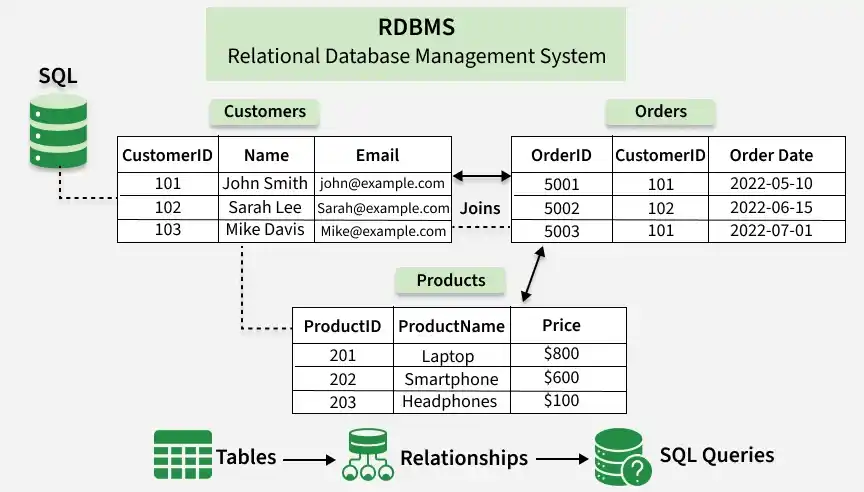
RDBMS maintain data integrity by simulating the following features:
No two records of the database table can be completely duplicates.
Only the rows of those tables can be deleted which are not used by other tables. Otherwise, it may lead to data inconsistency.
Rules defined by the users based on confidentiality and access.
The columns of the database tables are enclosed within some structured limits, based on default vlaues, type of data or ranges.
Database Table#
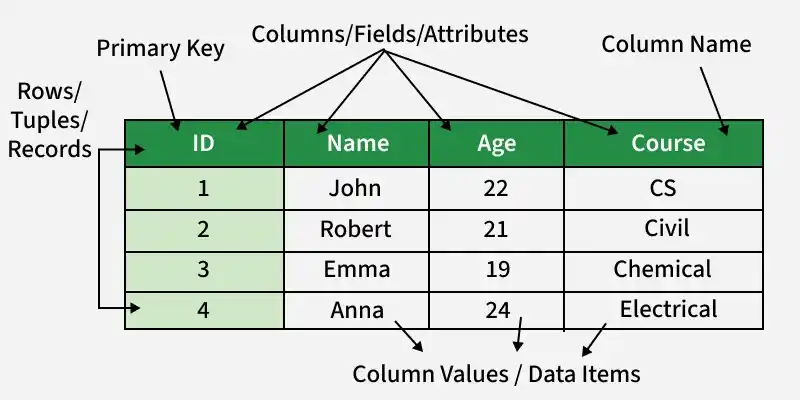
A table is a collection of related data in an organized manner in the form of rows and columns.
Features of RDBMS#
Data must be stored in tabular form in DB file and it should be organized in the form of rows and columns.
Each row of table is called record / tuple. Collection of such records is known as the cardinality of the table.
Each column of the table is called an attribute / field. Collection of such collumns is called the arity of the table.
No two records of the DB table cna be same. Data duplicity is therefore avoided by using a candidate key. Candidate Key is a minimum set of attributes required to identify each record uniquely.
Tables are related to each otehr with the help of foreign keys.
Database tables also allow NULL values, that is if the values of any of the element of the table are not filled or are missing, it becomes a NULL value. (Note: Primary keys cannot have a NULL value.)
Working of Relational Database Model#
The relational database enables any table to be associated to another table by means of a common attribute. A change to a data model where data is stored, accessed, and related in tables without restructuring the tables that hold them in place of hierarchical structures.
Each spreadsheet in the relational database model is a table that contains data, which is shown as rows (tuples) and columns (attributes).
A data type is specified by an attribute (column), and the value of that partiuclar data type is contained in each record (or row).
A primary key is an attribute found in all tables in a relational database that serves as a unique row indentifier.
Roll Number |
Name |
Section |
|---|---|---|
1 |
Sophia |
A |
2 |
Jack |
B |
3 |
David |
A |
4 |
Olivia |
C |
Uses of RDBMS#
Customer Relationship Management
Online Retail Platforms
Hospital Management Systems
Business Intelligence
Data Warehousing
SQL Query in RDBMS#
Creating a Table#
CREATE TABLE table_name (
  column_name datatype constraint,
  ...
);
Inserting Data into a Table#
INSERT INTO table_name (column_name, ...)
VALUES (value, ...);
Querying Data#
SELECT column_name, ...
FROM table_name
WHERE condition;
Deleting Data from a Table#
DELETE FROM table_name
WHERE condition;
Dropping a Table#
DROP TABLE table_name;
Advantages versus Disadvantages of RDBMS#
- Easy to Manage
Each table can be independently manipulated without affecting others.
- Security
It is more secure consisting of multiple levels of security. Access of data shared can be limited.
- Flexible
Updating of data can be done at a single point without making amendments at multiple files.
- Users
Some RDBMS supports client-side architecture storing multiple users together. Facilitates storage and retrieval of large amount of data.
- Fault Tolerance
Replication of databases provides simultaneous access and helps the system recover in case of disasters, such as power failures.
Data consistency is ensured as RDBMS is based on ACID properties for data transactions.
- High Cost and Extensive Hardware
Huge costs and setups are required to make these systems functional.
- Scalability
In case of addition of more data, servers along with additional power, and memory are required.
- Complexity
Voluminous data creates complexity in understanding of relations and may lower down the performance.
- Structured Limits
The fields or columns of a relational databse system is enclosed within various limits, which may lead to loss of data.
NoSQL versus RDBMS#
NoSQL |
RDBMS |
|---|---|
Data elements need to access individually. |
Multiple data elements can be accessed at the same time. |
No relationship between data. |
Data is stored in the form of tables which are related to each other. |
Normalization is not present. |
Normalization is present. |
DBMS does not support distributed database. |
RDBMS supports distributed database. |
Not all Codd rules are satisfied. |
All 12 Codd rules are satisfied. |